
Owner support
NPH-1
Persistent Meshtastic device
The manual, specifications and downloads for your NPH-1.
User manual
Tap a section to open it. Start with the first two before you power the radio.
01Read before use
Warning: attach antennas first
Do not wake, power, or transmit with the LoRa antenna removed. Operating without the correct antenna may damage the RF output stage.
Warning: use the correct ports
Follow the engraving on the back of the unit: Bluetooth antenna on BLE, LoRa antenna on LORA.
Caution: USB power
Use 5 V USB-C power/data only. Do not use high-voltage trigger cables, bench supplies, or unknown adapters.
The back engraving identifies each antenna connector. Install the Bluetooth antenna on the port marked BLE. Install the long LoRa antenna on the port marked LORA.
Before every field use
- Both antennas installed and snug
- USB-C cap installed before exposure to water/dust
- Correct Meshtastic region selected before transmitting
- No visible damage to antennas, SMA connectors, cap, or enclosure
02Quick start
- Install antennas Follow the back engraving: BLE antenna to BLE, LoRa antenna to LORA.
- Wake the device The NPH-1 has no power button. Plug in USB-C power or data to wake it from shutdown mode.
- Open Meshtastic Use the Meshtastic mobile app or compatible RAK4631 software.
- Pair and configure Pair over Bluetooth, set region, set channel, and send a test message.
- Seal for field use Disconnect USB if desired and reinstall the USB-C sealing cap before field deployment.
03Device layout
Key exterior items
- BLE antenna port: install the Bluetooth antenna here
- LORA antenna port: install the LoRa antenna here
- USB-C sealed cap: install before field exposure
- Rear clip / mounting side: keep antennas clear of body and metal
- No external power button: wake through USB-C
04Power and charging
The NPH-1 has no external power button.
Units may be shipped in software shutdown mode. To turn the device back on, connect USB-C power or USB-C data. Power behavior after wake is managed by the installed firmware/software.
| State | What to do |
|---|---|
| Shipped / shutdown | Connect USB-C power or data to wake |
| Charging | Use 5 V USB-C only |
| Firmware update | Use a data-capable USB-C cable |
| Field use | Install USB-C cap and antennas before exposure |
05Firmware and software
The NPH-1 is based on RAK4631-compatible hardware. It ships with Meshtastic firmware and may be used with software or firmware intended for the RAK4631 platform. Delta Plus Proto support applies to shipped firmware and recommended tools.
Use DeltaMeshFlasher to place the NPH-1 into DFU mode. Current functionality is DFU entry only. After the device appears as a DFU/mass-storage device, drag suitable RAK4631-compatible firmware onto the device. Additional flashing and firmware-management functions are planned for a later release.
Manual DFU: an internal DFU button may be used for recovery. Opening the enclosure can affect sealing if reassembled incorrectly.
06Battery and field care
Internal 5200 mAh Li-ion battery. The battery is not user-removable. Do not open the device for battery replacement unless directed by Delta Plus Proto support.
Before field use
- Antennas installed and finger-tight
- USB-C cap fully installed
- No visible cracks or damaged seals
- Correct software region and channel set
After exposure
- Dry before charging
- Remove dirt from cap area
- Do not charge with moisture in USB-C port
- Inspect antenna connectors
07Troubleshooting
| Issue | Check / action |
|---|---|
| Will not wake | Connect USB-C power or data. Confirm the cable is not charge-only. |
| Phone cannot find radio | Restart app, keep radio near phone, reconnect USB, retry Bluetooth pairing. |
| No messages | Confirm same Meshtastic channel, region, modem preset, and network settings. |
| Poor range | Keep LoRa antenna vertical, raise the node, avoid body/metal blocking, use relay nodes. |
| Firmware update fails | Use DeltaMeshFlasher and a USB-C data cable. Enter DFU if needed. |
| Wet USB-C area | Do not charge. Dry fully, clean cap area, reinstall cap before field use. |
| Used without antenna | Stop transmitting and contact support. RF output damage may have occurred. |
Specifications
| Output | 22 dBm |
|---|---|
| Radio module | RAK4630 – Semtech SX1262, Nordic nRF52840 |
| Enclosure | CNC-machined aluminum, made in-house |
| Runtime | 2–4 weeks typical |
| Antennas | Dual external: LoRa and Bluetooth LE |
| Weight | 420 g |
| Charging | Waterproof USB-C |
| Firmware | Meshtastic, MeshCore or Reticulum; pre-configured |
| Dimensions | 2.0" W × 1.65" D × 4.2" H |
| Battery | 5200 mAh removable Li-ion |
| In the box | Sealing cap, belt clip, mounting files; antennas and cable with that option |
Downloads
DeltaMeshFlasher
Flashing tool: puts the NPH-1 into DFU mode over USB with one click, then you drag the firmware file onto the drive that appears.
User manual
8-page quick reference: warnings, quick start, device layout, power and charging, firmware, field care and troubleshooting.
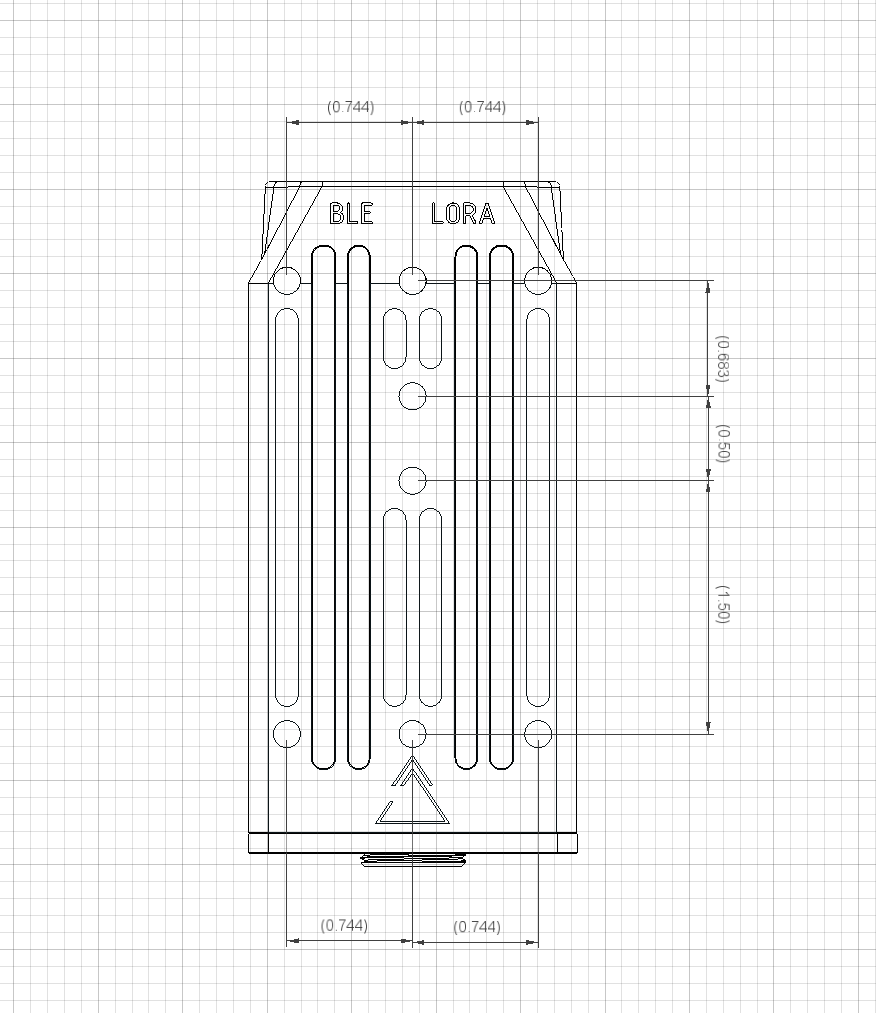
Mounting bolt pattern
Hole spacing on the back of the enclosure, in inches, for designing custom mounts and brackets.
Support
Questions, a problem, or water or physical damage? Email us and you'll hear back from the people who built your radio.
Please include
- Device model (NPH-1)
- Firmware or software you are using
- What happens: the symptoms
- Photos, if there is physical damage or water exposure
Returns are available for manufacturing defects within 60 days of delivery.